From Rendering Objects To Building Worlds
Up through the last dev log, RetroEngine could render things:cubes, meshes, sprites, textures, lighting, all of it worked great. But everything lived in the moment.
You could place objects, tweak materials, move them around…and the second you closed the app, it was all gone.
That was fine early on to proof things out. But it also meant the editor wasn’t really an editor yet. It was a sandbox.
This update is about the line RetroEngine crossed next: moving from rendering individual objects to authoring actual scenes.
What A “Scene” Means In RetroEngine
A scene is the missing layer between raw rendering and world-building. It represents a complete snapshot of:
- a collection of entities
- their transforms
- their meshes
- their materials and textures
Scenes serialize cleanly to disk as .scene.json files and can be loaded
back into the engine through the editor. This format is easily human-readable and simple to diff which is nice.
This is where RetroEngine stopped being “a renderer with UI” and started behaving like a real engine.
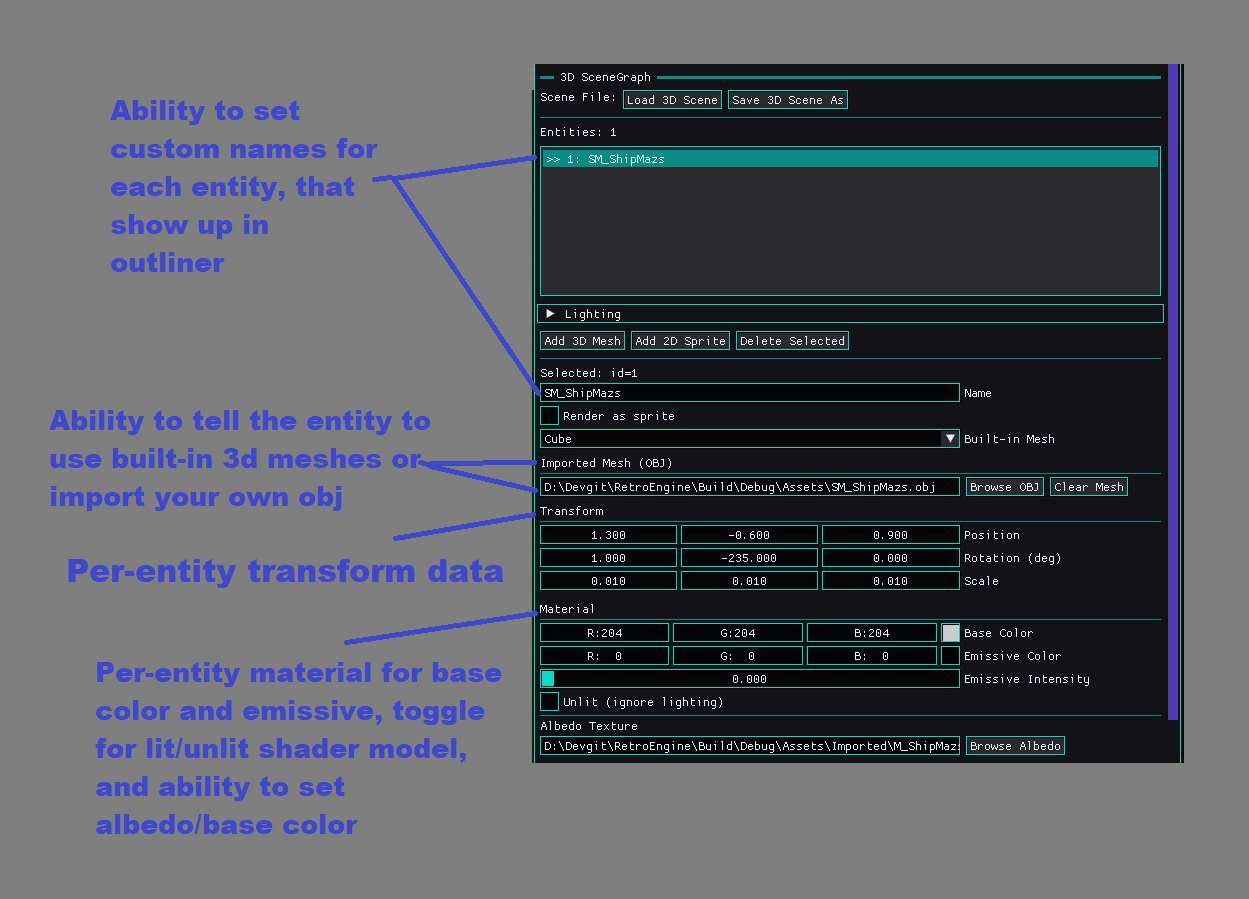
The Editor Finally Has Memory
Once scenes were in place, the editor workflow changed immediately.
You can now:
- add entities
- assign meshes and textures
- adjust transforms and materials
- save the entire scene to disk
- reload it later exactly as you left it
That single ability, adding save states, completely changes how the engine feels to use.
Then I Tried Loading A Second Scene
The first scene loaded perfectly.
The second one crashed the engine.
Every time.
The error looked like a classic memory failure: std::bad_alloc,
D3D12 warnings, GPU resources being allocated again and again.
On paper, it looked like a leak. In reality, it was something more subtle, and more dangerous.
The Bug Wasn’t Memory, It Was Ownership
The problem wasn’t that resources weren’t being freed. The problem was who thought they owned them.
When loading a new scene, the editor was directly reaching into renderer state and attempting to reset parts of the scene system itself.
That worked once. Then it corrupted the state.
The fix wasn’t complicated, but it was architectural.
The renderer owns the SceneRenderer. Period. The editor is allowed to ask, not reach.
if (auto* sr = Renderer::GetSceneRenderer())
{
    sr->ResetSceneState();
}
One line of access discipline fixed an entire class of crashes.
Proof: Stable Multi-Scene Loading
With ownership cleaned up, scenes can now be loaded repeatedly, back-to-back, without restarting the engine.
Different meshes. Different materials. Different textures. Same renderer. Same session. No crashes.
Why This Matters More Than It Sounds
Scene loading isn’t flashy. There’s no new shader trick here.
But this is the foundation everything else sits on.
Without correct ownership, saving and loading becomes a ticking time bomb. With it, RetroEngine can now safely grow.
Cameras, lighting per scene, level iteration: all of that only works if the engine knows who owns what, and when.
Where RetroEngine Stands Now
- 3D scenes serialize cleanly to disk
- Editor-driven scene authoring is stable
- Multiple scenes can be loaded in one session
- Renderer and editor responsibilities are clearly separated
- CRT pipeline remains fully intact across scene changes
What Comes Next
Scenes currently focus on geometry and materials. Lighting and cameras are intentionally global for now.
The next steps are obvious and finally safe to tackle:
- scene-level lighting
- scene-level cameras
- editor camera controls
- clean scene transitions
This update didn’t add spectacle. It added stability.
And that’s how engines actually grow.